
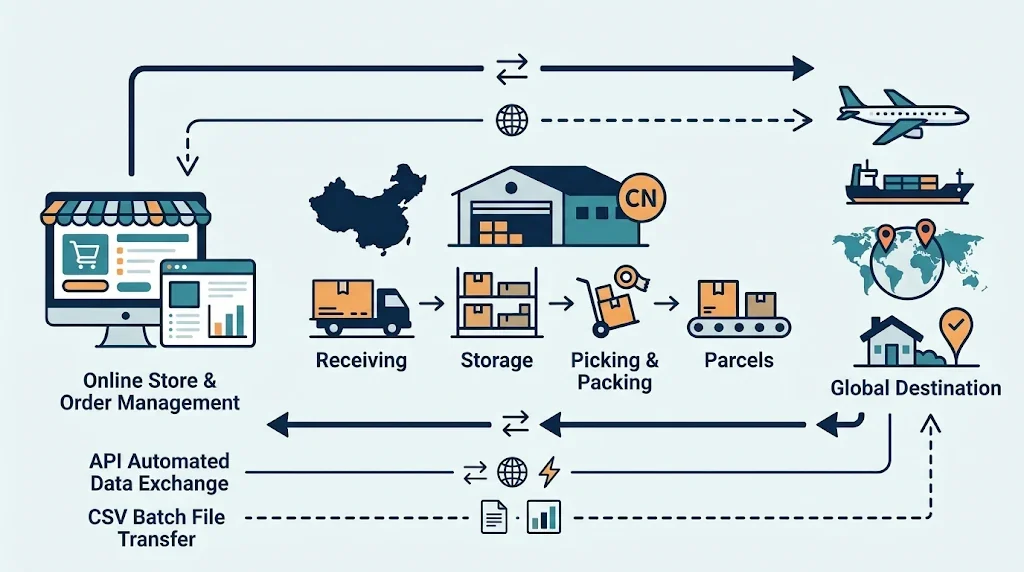
If your Shopify store sells to overseas customers and your inventory is in China, orders need to move from your store to the team that receives, stores, picks, packs, and dispatches them. That handoff can use an API connection or a controlled CSV process. The right choice depends on the provider’s actual systems, your order workflow, and who will monitor exceptions.
An API can automate agreed data exchanges, but it does not automatically guarantee inventory synchronization, shipment tracking, or support for every order change. A CSV process can work for reviewed batches, but each transfer needs an owner and a reconciliation step. Confirm what both sides can support before releasing live orders.
What does the connection need to do?
Shopify order data and warehouse work are related, but they are not one single update. Before choosing a connection method, map three separate flows:
- Order handoff: which eligible orders and line items the warehouse is authorized to process.
- Shipment write-back: how accepted work, shipped quantities, carrier details, and tracking return to Shopify.
- Inventory updates: what warehouse quantities mean and how changes reach the storefront.
Shopify’s fulfillment model uses fulfillment orders assigned to locations. An app or integration must follow the model and permissions that apply to its role; a customer-facing order number by itself may not be enough to identify the work. Ask the provider to explain how its warehouse records map to your Shopify store and locations. See Shopify’s fulfillment service app documentation.
API vs. CSV: compare the operating model
API vs. CSV workflow comparison
| Decision area | API workflow | CSV workflow |
|---|---|---|
| Order handoff | Can submit eligible orders automatically when both systems support the agreed rules | Sends reviewed orders in batches using an approved template |
| Acknowledgment | Can return machine-readable acceptance, rejection, or status updates if implemented | Uses an import report or another agreed confirmation |
| Changes and cancellations | Must define which changes are supported and when warehouse work can no longer be stopped | Requires a documented change file or operator handoff |
| Tracking | Can return shipment details through the integration if the workflow supports it | Requires an approved return-file process and a defined Shopify update step |
| Inventory | Can send updates on agreed events or a schedule | Uses dated snapshots or reports that must be checked before applying |
| Oversight | Needs technical monitoring, maintenance, and an incident owner | Needs batch controls, an operator, and a handover process |
Treat this table as a set of questions, not a promise about any particular warehouse. Ask the provider to demonstrate the exact steps it supports.
When an API workflow may fit
An API connection may suit a store that needs frequent order handoffs or regular status updates and has an integration that both Shopify and the warehouse can maintain. Before approving it, ask:
- Is the connection a maintained Shopify app, middleware, or a custom integration?
- Which orders can it release, and how does it handle holds, rejected orders, and cancellations?
- How are multiple products, partial shipments, and multiple parcels represented?
- Does it send shipment and inventory updates back, or only send orders to the warehouse?
- Who monitors failures, maintains field mappings, and responds when synchronization stops?
“API available” does not answer these questions by itself. Shopify documents separate fulfillment actions, including requests, acceptance or rejection, cancellations, and shipment creation. The implementation needs to match the provider’s actual role and supported workflow. For example, partial shipments need the correct line items and quantities when creating a fulfillment. See Shopify’s fulfillment service workflow and fulfillmentCreate reference.
When a CSV workflow may fit
A CSV workflow may be a practical starting point when the team can work in scheduled batches and assign someone to prepare, validate, and reconcile each transfer. It can also help both sides confirm product mappings and warehouse procedures before investing in a more automated connection.
Agree on three files or records: the outbound order batch, the warehouse acceptance or rejection report, and the shipment return data. Give each batch a unique reference and preserve an unchanged copy of what was sent. The return process should identify shipped items and quantities, parcel references, carrier, and tracking details.
Shopify’s order export is not automatically the warehouse’s import template. Check the export structure—especially orders with multiple line items—and map it to the warehouse’s approved fields. Shopify provides a guide to exporting orders. Separately agree how shipment information will be written back to Shopify; an order export alone does not confirm that fulfillment records or customer tracking updates have been created.
Agree on data and responsibilities
Before connecting systems, approve a field list with both the merchant and warehouse. Include:
- Store and order references, product or variant identifiers, warehouse SKU, and quantities.
- Recipient and destination fields required for dispatch.
- The requested service code, package instructions, and any order hold.
- Warehouse acceptance or rejection, shipped quantities, parcel references, carrier, and tracking.
- Inventory quantities, their definitions, and the time each quantity was recorded.
Keep order transfer, inventory updates, and shipment write-back as distinct parts of the plan. Shopify’s inventory CSV process is separate from order exports; confirm how location-specific quantities are maintained and validated. See Shopify’s inventory CSV guidance.
Write down who owns each decision. The merchant should define which orders are ready to release and handle customer-facing decisions. The warehouse should confirm physical receipt, stock exceptions, picking and dispatch status, and the information it can return. The integration or file operator should track transfers, rejected records, and missing updates. Limit customer data to what the workflow requires, and confirm access with the people responsible for the systems.
Test the workflow before releasing customer orders
Run a small, approved pilot and compare results in Shopify, the transfer record, and the warehouse system. Include failure cases, not just a successful order. A practical test list is:
- An order with several products maps to the correct SKUs and quantities.
- An unknown SKU or incomplete address is held and reported to an owner.
- A repeated API event or repeated CSV batch does not create duplicate work.
- A cancellation or address change after acceptance follows an agreed procedure.
- A partial shipment returns only the shipped quantities with the right tracking.
- A warehouse stock update has a clear meaning and timestamp.
- A missing acknowledgment or tracking update is found during reconciliation.
Shopify notes that webhook deliveries can be duplicated or arrive out of order; API workflows need suitable verification and recovery controls. CSV workflows should record batch totals and reconcile every accepted and rejected record. See Shopify’s webhook delivery guidance.
Set your own acceptance targets before the pilot—for example, how long an order may wait for acknowledgment or how old an inventory update can be. Agree these targets with the provider rather than borrowing an unsupported industry benchmark.
How should you choose?
Choose the workflow your team and provider can observe and recover:
- Consider an API when frequent updates matter and both sides can support the complete handoff, return data, exception handling, and maintenance.
- Consider CSV when reviewed batches fit your operating rhythm and a named person can validate files, resolve exceptions, and prevent accidental resubmission.
Do not choose based on an arbitrary daily order threshold. Compare setup, monitoring, support, manual review, and error recovery using your own pilot results. You may start with files and later move to an API, but preserve the same SKU mappings, release rules, and reconciliation checks during the change.
Discuss your China-side fulfillment workflow
If you are planning a Shopify order handoff for inventory held in China, outline your SKU count, order process, and preferred method—API or file exchange—before transferring stock. Ysclink’s Services page describes its China-side fulfillment scope. You can also request a tailored discussion to confirm which workflow is available for your requirements. This article does not assume that Ysclink has a Shopify app or a specific integration capability.
FREQUENTLY ASKED QUESTIONS
Shopify and warehouse integration questions
Can a Shopify store use a China fulfillment warehouse?
It can, if the merchant and warehouse agree on the order handoff, fulfillment responsibilities, shipping services, and how shipment information returns to Shopify. Confirm the provider’s actual integration or file process before sending inventory.
Is API always better than CSV?
No. An API can automate supported exchanges but needs maintenance and monitoring. CSV can suit controlled batches when each file has an owner, validation rules, and reconciliation.
Does an API automatically sync inventory and tracking?
Not necessarily. Ask which information the connection sends in each direction, how often it updates, and what happens when a record is rejected or delayed.
What should I confirm before sending inventory to China?
Confirm receiving instructions, SKU mapping, the intended order-release process, how stock is reported, which destinations and shipping services are in scope, and who handles exceptions. Start with a limited, agreed pilot.